Running a Discord giveaway takes seven decisions, made in order. Three of them happen before you launch, and those three matter most. Most hosts make the first two, skip the rest, and get a spike of reactions that changes nothing.
This guide walks all seven, following one campaign on Nightfall, a 4,000-member gaming server we made up for this guide.
How to Make a Giveaway on Discord
Discord has no built-in giveaway feature, so every giveaway starts by adding a Discord giveaway bot. From there it takes about five minutes. If you haven't picked one yet, the comparison of Discord giveaway bots covers eight that run giveaways and three big names that don't.
- 1
Add a giveaway bot to your server
You need the Manage Server permission on the server you're adding it to. Add ScopliDrop to your server, authorize it, and pick the server from the list.
- 2
Open the server dashboard
Go to your server list and select the server. You'll see servers where you have Admin or Manage Server, plus any where someone granted you access through granular role permissions.
- 3
Set the prize, the winner count, and the end time
Open Giveaways and click New Giveaway. The prize text is what members see in the announcement, so name the actual item rather than "a surprise".
- 4
Choose how people enter
Pick an entry mode. One click in Discord, a task list on the web, or a mix of both. This decision shapes who enters more than any other. Stage 1 covers how to pick.
- 5
Set who is allowed to win
Before you launch, decide the exclusions: staff roles, a minimum account age, recent winners. Deciding this after the draw is what makes a giveaway look rigged.
- 6
Pick the channel and launch
Choose the announcement channel and publish, or schedule it for later. The bot posts the embed, opens entries, closes them at your end time, and draws the winner.
That's the setup. The rest of this article covers the decisions that make the giveaway worth running.
The Seven Decisions Behind a Giveaway That Works
- Pick the one thing you want more of, whether that's members, followers, or activity.
- Build the entry flow, keeping required tasks light and the rest as bonuses.
- Decide who is allowed to win, before anyone knows who is winning.
- Schedule the launch for your server's peak hours.
- Give every entrant a referral link, and say out loud that it exists.
- Draw the winner, review the flags, and hand off the prize.
- Turn the entrants who didn't win into members who stay, with activity rewards and a repeating cadence.
Even a giveaway run with a reaction and a random-number generator passes through all seven. The host just makes them without noticing, and usually badly.
Meet Nightfall
Nightfall's manager runs one giveaway a month and wants the next one to leave the server bigger than it found it. The whole budget is a single $60 game key, so it has to do more than make one person happy.
Stage 1: Pick the One Thing You Want More Of
You are spending a prize, and you should know what you want back for it. A giveaway can produce Discord members, social followers, activity in a quiet server, or attention for a launch. It can touch several of those at once, but the campaign works best when you set one main focus.
Write it down in one sentence before you open the builder. Every decision after this one follows from it. Hosts who skip it pick tasks that sound good instead of tasks that serve the goal.
Nightfall wants new members who stay. That single choice settles the next two decisions.
How Much You Ask For Decides Who Enters
Ask for nothing and a crowd enters. Ask for eight tasks and far fewer enter, but each one did something on the way in. Neither is correct. What you named above decides how much to ask for.
ScopliDrop calls this the entry mode, and there are four of them:
| Mode | What entering costs | Best when |
|---|---|---|
| Taskless | One click in Discord | The prize is the point and you want maximum participation |
| Web Task-based | At least one task, on the web | The giveaway exists to grow something specific |
| Flexible | One click, with optional tasks for more entries | You want both a crowd and depth |
| Discord In-App | Discord-native tasks, no web page | Your audience should never leave Discord |
The four Discord giveaway entry modes shown in the ScopliDrop giveaway builder
Nightfall picks Flexible. Everyone gets in with one click, so the entry count stays high and the giveaway looks worth entering. Motivated entrants complete tasks for more entries.
One consequence of Flexible worth knowing before you pick it. Fraud screening and country rules run on the web entry path, where an entrant arrives through a browser. A click inside Discord does not expose enough about an entrant to screen on. Only entrants who open the task page get screened. If every entrant must be filtered, use Web Task-based, where everyone comes through the web.
The Prize Decides the Audience
A $60 game key attracts people who want that game. A $600 cash prize attracts people who want $600, which is everyone. Most of them will never open your server again.
Nightfall picked a key that fits its niche on purpose. A smaller, specific prize brings fewer entrants and better ones.
Stage 2: Build the Entry Flow
Now decide what an entrant does. Each task is a small transaction. You ask for an action, and you pay in entries.
Required Tasks Are a Tax, Bonus Tasks Are an Offer
Keep the required list short. Every additional requirement multiplies drop-off, because each one is another chance for someone to decide the prize isn't worth it.
Nightfall requires nothing (Flexible mode gives a free base entry) and offers four bonus tasks:
- Follow the server's TikTok, worth 2 entries
- Subscribe on YouTube, worth 2 entries
- Reach level 3 in the server, worth 5 entries
- Send 20 messages, worth 3 entries
A ScopliDrop giveaway with required and optional bonus tasks configured
The last two are the interesting ones. They're activity tasks, so the only way to finish them is to take part in the server. An entrant chasing 8 extra entries has to talk to people, and a member who has talked to people is more likely to stay.
Not every task in the lineup gets checked the same way. Discord actions are confirmed automatically, while most social platforms publish no API for follows and likes, so those tasks collect proof you review. The full breakdown of verification methods covers which tasks land in which class, and the constraint applies to every giveaway tool on the market.
Set Entry Values to Match Your Goal
The entry value of a task tells entrants what you care about. Nightfall pays more for in-server activity than for a social follow, because members who stay were the stated goal in Stage 1.
Set the values backwards and you'll get exactly what you paid for.
If the Task You Need Doesn't Exist
The built-in task list covers the platforms everyone shares. They have no task for joining your beta or reaching level ten in your game. Custom tasks let you define one with your own name, icon, and up to three data fields.
Nightfall adds one that asks for a name and an email address. Every submission lands in the participant CRM covered in Stage 7, which gives Nightfall a way to reach these entrants again later, outside Discord.
Stage 3: Decide Who Is Allowed to Win
This stage decides whether your community trusts the giveaway. Lose that trust and people stop entering without ever telling you.
Eligibility decided before launch is a rule. Eligibility decided after the draw is a rigged giveaway. Same decision. It only looks different because of when you made it.
So Nightfall settles every exclusion now, while nobody knows who's going to win.
Staff Cannot Win
The fastest way to poison a giveaway is a winner announcement with a moderator's name on it. Even a clean draw looks arranged.
Nightfall adds its moderator and admin roles to the giveaway's blacklist roles. Anyone holding one is turned away at entry, before a single task appears, and inside Discord they're told exactly which role blocked them.
Blacklist role and winner cooldown settings in the ScopliDrop giveaway builder
The blacklist applies at entry only. If you give someone the role later, their existing entry stays and the block applies to their next one. Entrants can't be disqualified after the fact, and you still decide who gets in from here.
The Same Three People Cannot Keep Winning
A winner cooldown locks recent winners out of the draw for a number of days you set. It keeps prizes moving around the community instead of landing on the same four names.
Throwaway Accounts Cannot Enter
A minimum account age turns away accounts younger than a threshold you pick, anywhere from 1 to 365 days. The age comes from the Discord ID itself, because every Discord ID carries the date the account was created. It's exact and can't be faked.
Nightfall sets 30 days. The default of 7 days stops accounts made on the day you launch. Setting 30 turns away a few genuine newcomers, and a lot more alts. Anyone who joined last month never notices the check.
The Prize Can Reach the Winner
Nightfall's prize is a digital key with no region lock, so this doesn't apply. It would matter for physical merch. Geo targeting restricts a giveaway by country in two modes. Block turns ineligible visitors away at the entry page. Warn lets anyone enter, then keeps ineligible entries out of the draw.
Warn mode is usually the right call for a regional prize. The giveaway still gets shared worldwide, and the prize still goes to someone you can ship to.
VIPs Skip the Tasks
The opposite of every rule above. Bypass roles let boosters and subscribers enter in one click at maximum entries, so better odds become a perk you can list in your boost benefits.
Nightfall gives its boosters a bypass. A bypass role skips the giveaway's tasks, not its security checks. Account age, the 2FA gate, and the blacklist all run first, so a trusted role never skips a security check. Where a member holds both a blacklisted and a bypass role, the blacklist wins.
Stage 4: Launch It at the Right Moment
A giveaway earns most of its entries early, while it's the newest thing in the channel. Launch it while your server is asleep and the best hours go to an empty channel.
The best window is your server's peak evening, which is frequently when you're busy or asleep. Scheduling splits building from launching. You set it up carefully in a quiet moment, and the bot launches it.
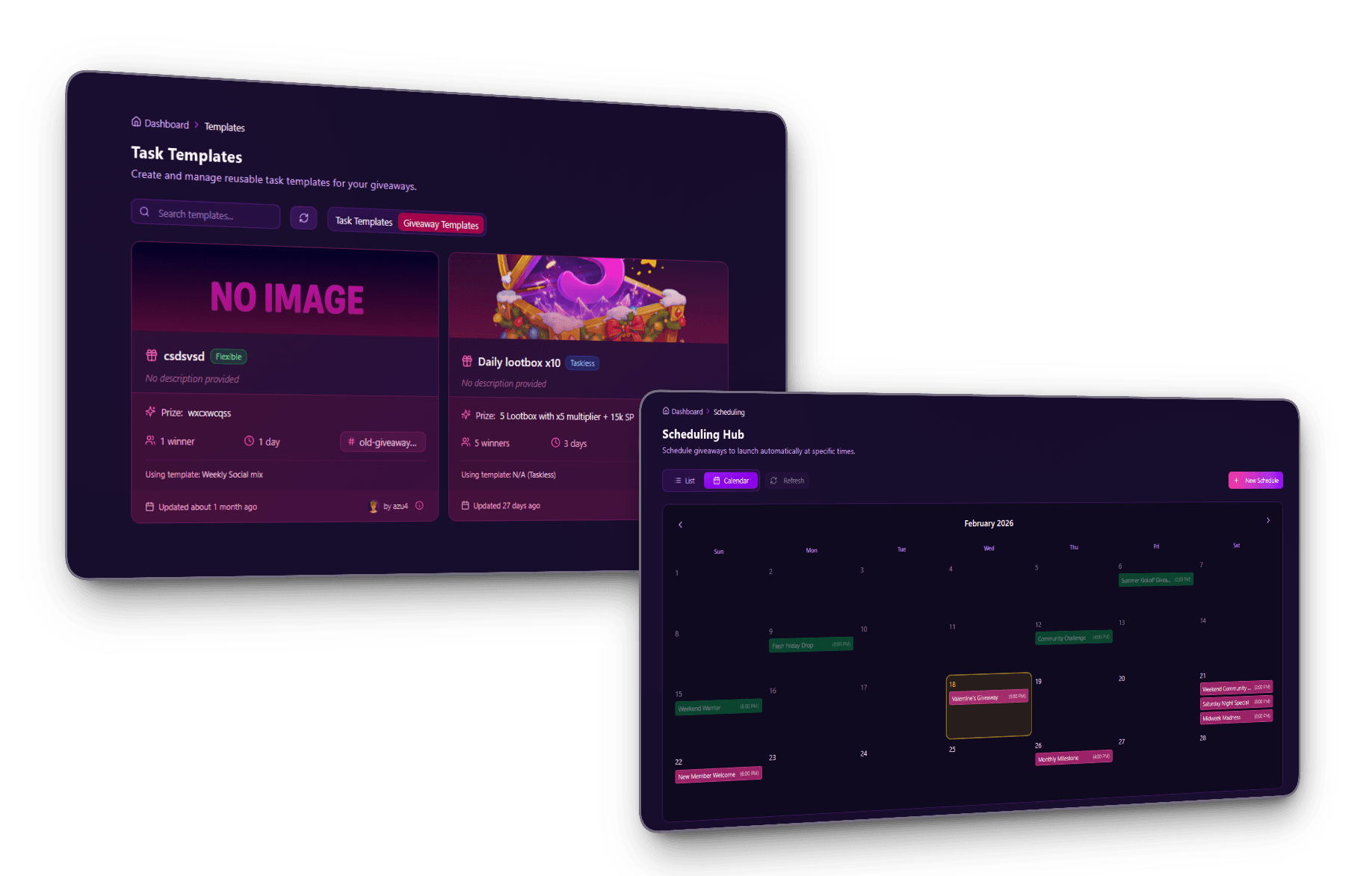
The ScopliDrop scheduling tab showing queued giveaway launches on a calendar
Nightfall queues the launch for Friday at 7 PM local, and the end for the following Friday.
Duration Changes Behavior, Not Just Length
Length changes what entrants do.
- 1 to 3 days creates urgency. People share fast because the deadline is visible.
- 1 to 2 weeks is the working default. Dedicated entrants have time to grind tasks and referrals, and in our experience sharing peaks mid-run.
- 3 weeks or more suits a major prize or a launch, but it needs ongoing promotion or the middle goes silent.
Nightfall picks 7 days, long enough for referrals to compound and short enough to stay urgent.
Save It Before You Launch It
The decisions above took thought. A giveaway template stores the whole configuration, so the next campaign starts from decisions you already made.
Promote one to server quickstart and the create form auto-loads it every time it opens. The safeguards from Stage 3 are then already in the form when a moderator builds a giveaway, so nobody has to remember the checklist.
Editing a template never changes a giveaway you already launched. Each giveaway captures a snapshot of its configuration at launch, so a tweak on Tuesday can't silently rewrite the rules you announced on Monday.
Stage 5: Make It Spread Past Your Own Members
Everything so far reaches the members you already have. This stage decides whether the campaign brings in new people or stays inside your server.
Every Entrant Gets a Link Worth Something
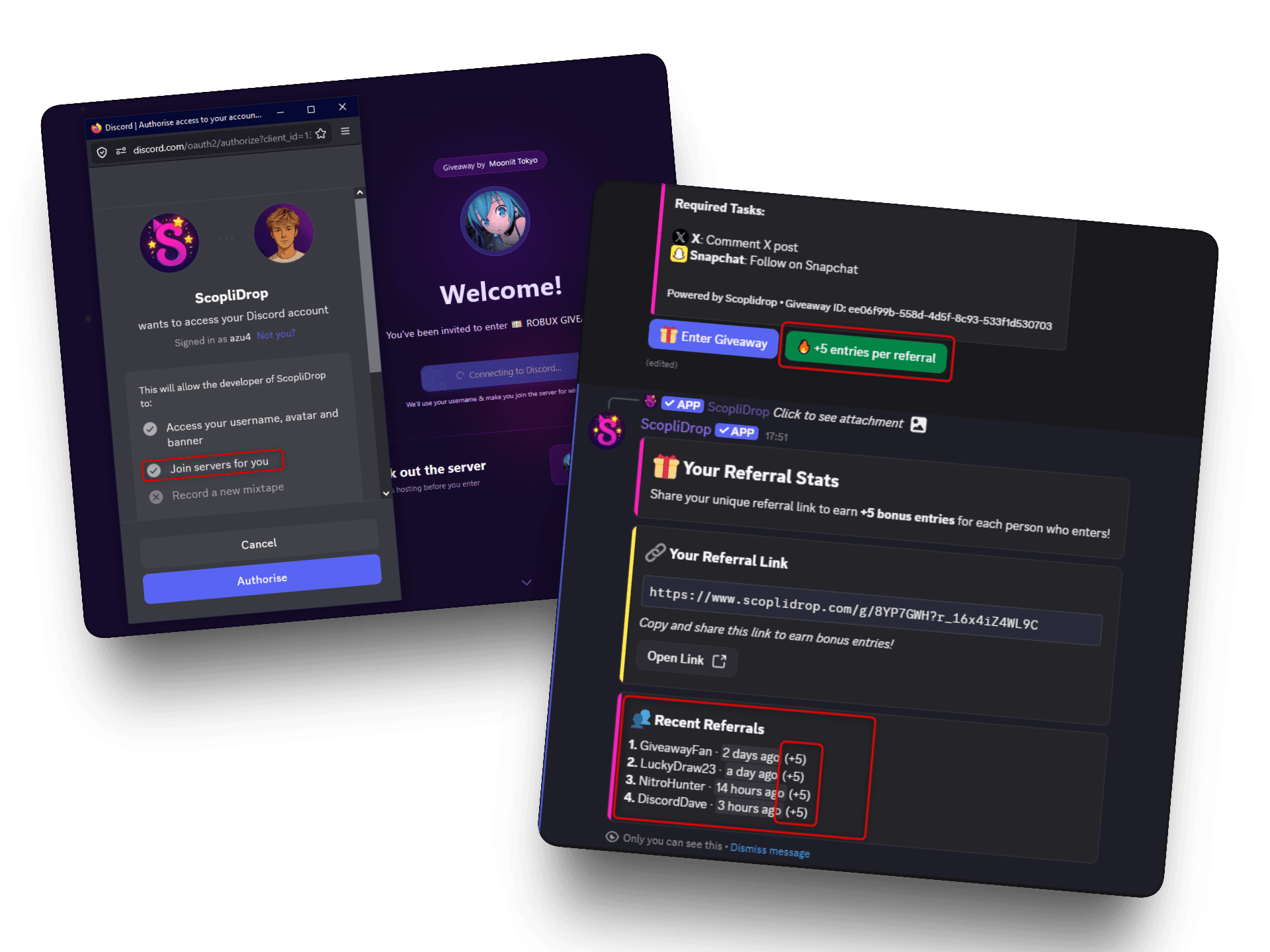
The referral system hands each participant a personal link after they enter. When a friend enters through it, the referrer's bonus entries land immediately and the friend joins the Discord server as part of entering.
The ScopliDrop referral system configuration and the referral button on a giveaway embed
It's on by default at 5 entries per friend, and you can set it anywhere from 1 to 100. It works in all four entry modes, including one-click taskless drops. Self-referrals are blocked, and unique-referrals mode stops the same friend group from referring each other every campaign.
This is also the compliant way to grow. Discord's platform manipulation policy names invite rewards as a prohibited practice. A referral link works differently, because it invites people to a giveaway and the server join happens as part of entering. The guide to Discord's invite reward rules covers where the line sits.
Announce the Referral Link Out Loud
This stage usually fails quietly. The referral system is on, and nobody uses it, because nobody was told it exists.
Nightfall posts a follow-up an hour after launch, once the first entries have landed and there are people to talk to. That one message does more for reach than any setting on this page.
🎁 **Get +5 entries for every friend you invite**

Everyone who entered for the $60 key already has a personal referral link. Tap the **🔥 +5 entries per referral** button on the giveaway message to grab yours.

Every friend who enters through your link is **+5 entries** for you, and the same button tracks how many you've brought.

Ends Friday at 7 PM.
Swap the prize, the entry value, and the deadline for your own.
Turning Sharing Into a Race
FOMO Mode caps the total referral bonuses the giveaway pays out, 40 slots by default, and shows a live count of slots remaining on the Discord button. Sharing early beats sharing late, so most of the sharing happens in the first hours, when each share has the most time to work.
Making Invites a Condition Instead of a Bonus
Requiring invites to win goes further. Entrants must bring a minimum number of friends to be eligible at the draw. Entry stays open to everyone, and the requirement is stated up front. The rule applies at winner selection. Entrants below the threshold are skipped.
Nightfall sets the threshold at 2. Two friends is doable for someone who clicked in for a game key. A target that feels reachable is the one people act on. Set it too high and entrants read it as impossible and stop trying.
Because entry stays open, the entry count doesn't suffer. What changes is who can win. Every eligible entrant brought two friends who entered themselves.
The Discord message shows how many entered next to how many are eligible, updated live. If the eligible count stays flat, lower the threshold or switch the requirement off while the giveaway is still running.
The Link Works Everywhere, Not Just Discord
Every giveaway gets a share link and a public entry page. Post it in a TikTok bio, a YouTube description, or on r/giveawaysondiscord, a subreddit where people go looking for Discord giveaways to enter. A visitor signs in with Discord once. That one step enters them and adds them to your server.
Setting a custom branded slug for a giveaway share link
Nightfall drops the link in its TikTok bio for the week. Promoting on TikTok and growing the Discord become one action.
Stage 6: Draw the Winner and Get the Prize Out
The giveaway ends. Plenty of campaigns fall apart right at the end, after all the work is done.
Review the Flags Before the Draw
While the giveaway ran, alt account and bot detection screened every entry arriving through the web portal. Entries tracing back to the same person get linked into a fraud ring. Enforcement is quiet on purpose. A flagged entrant sees a completely normal giveaway the whole time, so testing a setup with alts tells a cheater nothing.
ScopliDrop fraud ring view showing linked alt accounts and the reason each was flagged
Flags come in two levels. A red flag means the evidence is strong, and on plans with fraud detection that entry is excluded from winner selection automatically, so the draw is already protected. Yellow flags are the ones a human should look at before drawing. The evidence there points somewhere without proving anything.
A shared network alone never produces a serious flag, so roommates and families are safe by design. If you know two accounts belong to different people, clear the flag in one click. You can undo it later.
Hand Off the Prize Without Chasing Anyone
A winner is drawn and goes quiet. Without a process, someone on your team has to notice, then wait. Days later they decide the winner isn't coming back and reroll by hand, long after anyone still cares.
Claim tickets put a green claim button on the winner announcement. Clicking it opens a private channel only the winner and your chosen staff can see. Every claim runs on a deadline you set, anywhere from 1 minute to 30 days. A winner who never shows up is rerolled automatically, up to a cap you choose per prize.
Nightfall sets 48 hours with a reroll cap of 3. Long enough for time zones, short enough to stay live.
Delivering the Prize Itself
Nightfall's manager pastes the key into the ticket by hand, which is fine at one campaign a month.
At volume it stops being fine. Prize pools hold your codes encrypted, reserve one per winner at the draw, and reveal it privately inside the claim ticket. Staff see delivery status rather than the code, every reveal is recorded in the server audit log, and a rerolled winner's code returns to the pool automatically.
Prize pools require claim tickets, deliberately. The ticket is the only place where a code goes straight from encrypted storage to the winner.
Stage 7: Keep What the Giveaway Earned
One winner got a game key. Several hundred people entered. Almost all of the campaign's value sits in that second group. This stage decides whether they stay.
Look at What Worked
Giveaway analytics show task completion rates, which referral links converted, and where entrants dropped off. You read them to plan the next campaign. A task nobody completed is a task to cut, and a referrer who brought thirty people is someone to notice.
ScopliDrop giveaway analytics showing task completion and referral performance
Say Nightfall finds that people completed the YouTube subscribe task a third as often as the TikTok follow. Next month, TikTok gets the higher entry value.
Give the Newcomers a Reason to Stay
Several hundred people just joined for a key they didn't win. Without a reason to open the server again, most won't.
Activity tracking gives the server XP, levels, and automatic role rewards, so the members who arrived for the giveaway have something to climb. It's the same system behind the level-3 task in Stage 2, which is why that task was worth 5 entries.
Keep the Data You Collected
On Business, the participant CRM collects every field entrants submit into one profile per member. Someone who enters six giveaways is one contact with everything they've submitted. The names and emails from Nightfall's custom task in Stage 2 land here.
Your reach on Discord is rented. A rules change, a ban, or a member muting your server cuts it to zero. A giveaway is one of the few moments a member willingly hands over first-party data, because they want to win.
Do It Again on a Rhythm
One giveaway spikes activity for a day. A giveaway that lands every month at the same time becomes an appointment.
Recurring giveaways turn a schedule into a series that relaunches itself, keeping the next run queued automatically. Choosing a cadence is easy. Keeping it through the busy weeks is the hard part.
What Changes on Your Second Campaign
The first campaign teaches you things no guide can, because they depend on your specific community.
Your entry values were guesses. Now they aren't. Completion rates tell you what your audience will do, and the second campaign prices tasks off evidence.
Your duration was a guess too. Look at when entries arrived. If 80% landed in the first 48 hours of a 7-day run, the back half was dead air and the next one should be shorter.
Partnerships get easy once you have numbers. A "join this server" task swapped with a similar-sized community costs nothing and reaches an audience that already cares about your niche. The cross-promotion playbook covers how to structure the exchange, and it's a far easier conversation when you can show what your last campaign did.
A minimum participant threshold protects your budget. It holds the draw back until enough people have entered, so you don't hand out a prize on a campaign nobody saw.
Templates stop being optional. By the third campaign, re-entering the same decisions by hand is where mistakes creep in. They usually land in Stage 3. A missing safeguard is the kind of mistake your community finds before you do.
The Campaign Checklist
| Stage | The decision | Where it lives |
|---|---|---|
| 1 | What you want more of | Entry mode, prize choice |
| 2 | What entrants do | Task lineup, entry values, verification |
| 3 | Who is allowed to win | Blacklist, winner cooldown, account age, geo, bypass roles |
| 4 | When it launches | Schedule, duration, saved template |
| 5 | How it spreads | Referral reward, Invite-to-Win threshold, FOMO Mode, share link, the announcement telling people |
| 6 | How it ends | Alt screening, flag review, claim tickets, prize delivery |
| 7 | What you keep | Analytics, activity rewards, participant data, the next cadence |
Stage 3 before launch and Stage 7 after the draw are the two most commonly skipped, and they're the two that decide whether each campaign builds on the last.
Run This on Your Server
Every stage above is configured in one builder, and ScopliDrop is free to start. The free plan runs unlimited taskless and in-Discord giveaways, the full referral system, share links, blacklist roles, a minimum account age, and activity tracking with XP and levels, plus two tasks per giveaway, three saved templates, and one scheduled launch up to 24 hours ahead.
Fraud screening, bypass roles, claim tickets, recurring series, longer task lineups, and the analytics dashboard come with Premium. Prize pools, custom tasks, and the participant CRM are Business features, and geo targeting is Enterprise.
Add ScopliDrop to your Discord server and build the first campaign.
Frequently Asked Questions
The Part That Matters Most
Seven decisions, and the two most often skipped are the ones that decide whether the campaign was worth running.
Stage 3 is skipped because eligibility feels like paperwork until the moment a moderator's name lands on a winner announcement. Stage 7 is skipped because the giveaway feels finished once the winner is drawn. That's the exact moment several hundred newcomers decide whether to stay.
The prize is the smallest part of the campaign. What you decide around it is the rest.